

Finished school and wondering whether you are ready for NYSC registration?
One of the first things you need to confirm is your NYSC Senate List status. Your school may have completed its internal mobilization process, but that does not automatically mean your name is already available on the NYSC portal.
The Senate List is an important link between your institution and NYSC. If your name is not properly submitted and approved, you may be unable to proceed with online registration.
In this guide, you will learn what the NYSC Senate List means, how to check your name, why “No Record Found” may appear, how to fix common errors and what happens after your name is successfully confirmed.

What Is the NYSC Senate List?
The NYSC Senate List is the official record of graduates that have been cleared and approved by their institutions for participation in the National Youth Service Corps programme.
The record contains information such as:
Name
Matriculation number
Date of graduation
Registration status
Before a graduate's details can appear on the NYSC Senate List, the institution must verify and approve the graduate's eligibility.
This is why completing your school's clearance process is so important.
Why Does the Senate List Matter?
Think of the Senate List as the link between your school and NYSC.
It confirms that your institution has:
Verified your academic records.
Confirmed that you have satisfied the necessary requirements.
Approved you for mobilization.
It also helps NYSC prevent unqualified or fraudulent graduates from entering the mobilization process.
Most importantly, you cannot proceed with normal NYSC online registration or obtain a call-up number if your name is not on the Senate List.
Who Can Be Included on the NYSC Senate List?
According to the requirements covered in this guide, you must:
Have obtained a Degree or HND qualification.
Have studied in Nigeria.
Have completed your school's clearance and satisfied the required academic conditions.
If you have outstanding academic or clearance issues, your institution may not include your name in the approved list.
Who Sends the Senate List to NYSC?
The process starts with your institution.
Generally, the school:
Compiles the names of eligible graduates.
Screens and vets the records through the appropriate academic authority.
Approves the list.
Sends the approved information through the school's mobilization officer.
Uploads the details to NYSC for processing.
Until the institution completes this process, your name cannot appear on the NYSC Senate List portal.
How to Check Your Name on the NYSC Senate List
Before checking, have these details available:
Institution
Matriculation number
Surname
Date of birth
Follow these steps
Step 1: Visit the official NYSC Senate List portal.
Step 2: Select your institution from the available options.
Step 3: Enter your:
Matriculation number
Surname
Date of birth
Step 4: Click “Search.”
Step 5: Allow the system to process your information.
If your record is available, your mobilization details will be displayed.
If the system returns “No Record Found,” your information could not be located using the details provided.
Get your compulsory NYSC Medical Fitness Certificate and Report without unnecessary stress.
Found Your Name? Don't Stop There
Once your name appears, carefully check the information displayed.
Pay particular attention to your:
Name
Matriculation number
Course
Date of graduation
Other personal details
Identifying an error early gives you more time to contact your institution and request a correction.
Seeing “No Record Found”? Don't Panic Yet
A “No Record Found” message does not always mean that you are permanently excluded from NYSC.
Several things can cause the message to appear.
Possible reasons include:
Your school has not uploaded its Senate List yet.
Your name was not included in the list submitted by your institution.
You entered an incorrect surname or matriculation number.
Your school has completed its internal Senate List but has not yet uploaded the approved list to NYSC.
Your school may still be processing your records.
Also remember that schools do not all complete their mobilization processes at exactly the same time.
What to Do If Your Name Is Missing
If your name does not appear, the first thing to do is contact your school.
Do not immediately assume that the NYSC portal is the problem.
Follow these steps:
1. Contact your institution
Visit or contact your Student Affairs or mobilization office and ask whether your name was included in the approved list submitted to NYSC.
2. Resolve outstanding issues
If you have unpaid fees, incomplete clearance, carryovers or other unresolved academic matters, address them with your school.
3. Verify your information
Make sure your:
Surname
Date of birth
Matriculation number
match your school's records.
4. Give the school time to upload
Some institutions submit names in batches. If your school has not uploaded your details yet, your name may appear after a subsequent upload.
How Long Does Senate List Upload Take?
There is no single timeline that applies to every institution.
The process can take a few days, weeks or even months, depending on the school's internal processes and the NYSC mobilization schedule.
Generally, the process moves through several stages:
Final Clearance → Departmental/Academic Processing → School Board Screening → Approval → Mobilization Office → NYSC Upload → NYSC Processing
Depending on the NYSC calendar for the year, the process often takes one to three months after clearance, although the timing varies between institutions.
What Can Delay Your Senate List?
Several factors can slow things down, including:
Delayed Senate or Academic Board meetings.
Backlogs or spillover students being processed by the institution.
Technical problems affecting uploads to the NYSC portal.
The institution failing to submit its list within the mobilization period communicated by NYSC.
How to Track Your School's Senate List Submission
If you are waiting for your name to appear, don't rely on the NYSC portal alone.
You can:
Check your school's official website or notice board.
Contact the Student Affairs or mobilization office.
Follow updates from your department or school WhatsApp group.
Regularly check the NYSC Senate List portal.
If you continue seeing “No Record Found,” it may simply mean that your school's list has not yet been uploaded or processed.
Always prioritize information from your institution's official channels regarding the status of its submission.
Common NYSC Senate List Errors and How to Correct Them
Finding your name is good news, but don't immediately close the page.
Check the details carefully.
An error on your Senate List can create problems later during NYSC registration or at camp.
1. Wrong or Misspelled Name
If your name is incorrectly spelled, first establish whether the error came from your school's records.
What to do:
Report the mistake to your Student Affairs or mobilization office.
Provide documents showing the correct name.
Follow up until the school submits the correction.
Recheck the NYSC portal after the correction is uploaded.
Documents that may help establish the correct name include your admission letter, Statement of Result or valid identification.
The correction must reflect the name contained in your school's official records. Your institution cannot simply change it to a different name because you requested it.
In many cases, corrected information will only reflect after the institution sends another upload to NYSC.
2. Wrong Course of Study
Your course may sometimes appear differently from the programme you actually completed.
If this happens, the correction process is different from a name correction.
After completing online registration, you can apply for course correction through your NYSC dashboard.
You should also notify your Student Affairs Officer about the application.
According to the information covered here, the correction should reflect on your dashboard within a few hours rather than waiting for the next mobilization batch.
3. Incorrect Date of Graduation
Your date of graduation on the Senate List should correspond with the date on your Statement of Result or Certificate.
If the dates do not agree, it can create serious problems during the NYSC process.
To resolve the issue:
Report it promptly to your school's Student Affairs Officer.
The school may correct the Senate List entry for a subsequent batch.
In rare cases, the institution may issue another Statement of Result.
Confirm that the corrected date appears before the next mobilization exercise.
If the issue causes you to miss your intended batch, you may need to revalidate for a subsequent mobilization exercise.
General Steps for Fixing Senate List Problems
If your particular problem is not covered above, use this approach:
Go to your school's mobilization or Student Affairs office.
Explain the error clearly.
Submit a written complaint where required.
Attach photocopies of the documents showing the correct information.
Follow up with the institution until the correction is sent to NYSC.
Check the NYSC portal again to confirm that the correction has reflected.
Important
Corrections may not always reflect before the next orientation camp opens.
If your name or date of graduation remains incorrect, going to camp with the wrong information can result in you being sent back.
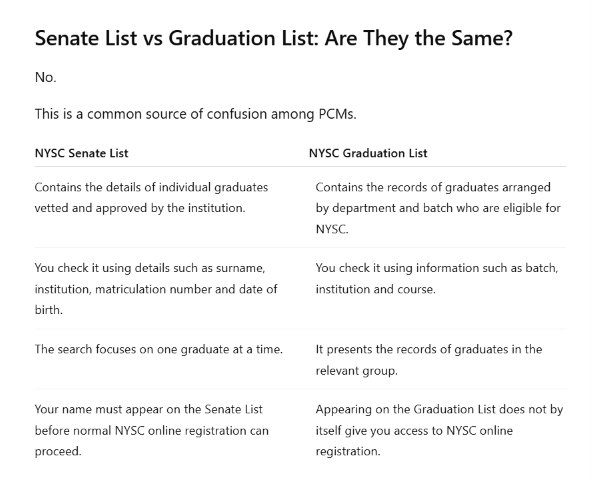
The simple difference
The Graduation List shows that you are among the graduates eligible for mobilization.
The Senate List is the institution-approved record that enables you to proceed with NYSC registration.
So, seeing your name on a Graduation List does not replace the need to confirm your Senate List status.
What Happens After Your Name Appears?
Once your name successfully appears on the NYSC Senate List, you can move to the next stage of your mobilization journey.
The process generally continues with:
Senate List Confirmation → NYSC Online Registration → Green Card → Call-Up Process → Orientation Camp
After your details are approved, you can create your NYSC profile, complete the required registration and generate your Green Card.
Later, NYSC will deploy you to a state for service, after which you can print your Call-Up Letter when it becomes available.Final Advice for PCMs
The NYSC Senate List is one of the most important checkpoints between graduation and NYSC registration.
If your name is there and your details are correct, you can move forward with greater confidence.
If it is missing, don't panic and don't assume you have lost your chance to serve. Contact your school, find out what is causing the delay and resolve any outstanding issue as early as possible.
And once your name appears, check every detail—not just your name.
A few minutes spent verifying your information now can save you significant stress later during NYSC registration and camp.